A tweet within a tweet within a… (or) Expand your Tweet’s real estate

UPDATED (March 25, 2015) AND… it’s back! (Filipino translation at the bottom) 
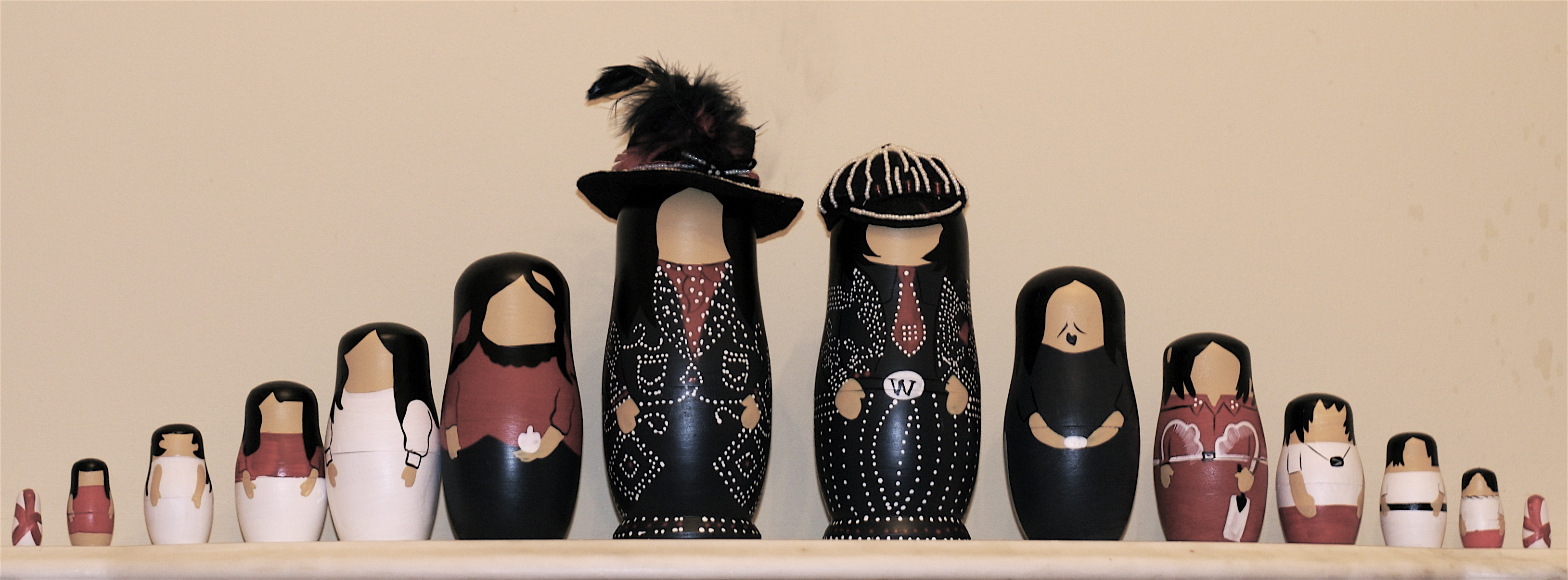
nesting dolls flickr/faithmonsoon

There is a way to retweet and add your own comment to it AND show the fully expanded tweet, even if the original tweet is 140-character full.  And If that tweet you are retweeting contains another tweet, your reader can go as deeply as the tweet-within-the-tweet goes, much like matryoshka dolls.

Steps in retweeting within a tweet:

1. Click on the time stamp of the Tweet you want to retweet and comment on:

sci museum permalink

2. Copy the permalink that appears on the address field of the screen and paste it on the Tweet you are composing

sci museum permalink
 

3. Tweet.  The retweet portion, when clicked on, links to the Tweet on which you are commenting.

ww1centenary tweet

NOTE: If the Tweet you are commenting on and retweeting contains a photo uploaded on Twitter (not a third party, like Instagram, etc), the photo appears with the retweet.
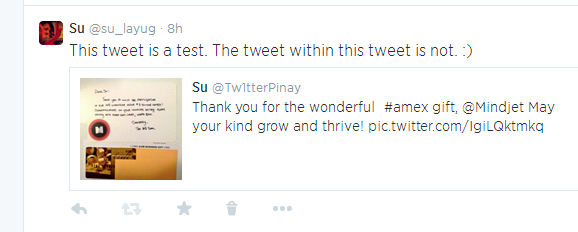
mindjet photo

Your tweet will also appear under the notification tab of the Twitter account you just retweeted.

If it becomes a popular method of retweeting, What I call “nesting tweets” can be a neat way of tracing an original tweet.

The Downside (or Upside, depending on the purpose of your Tweet)

When the retweet portion carries more vital information than the commenter’s Tweet, the commenter’s Tweet may get bypassed by the readers, giving the original
Tweet the subsequent retweets and favorites. This is the intended — and achieved — effect in the following public service Tweet by @twitter_ph:
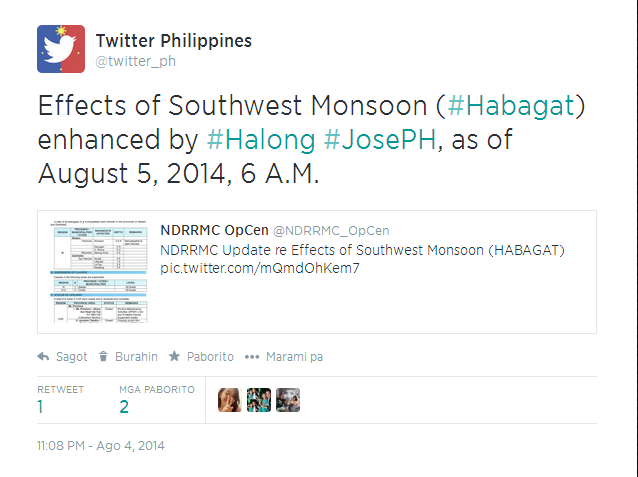
Twitter   twitter_ph  Effects of Southwest Monsoon ...

The commenter’s purpose (@twitter_ph) is to add the hashtags #Habagat #Halong #JosePH which make it easier for the intended audience (users in the Philippines) to find the public service Tweet.  Compare the number of retweets and likes of this Tweet with those of @NDRRMC_Open’s Tweet nested within:
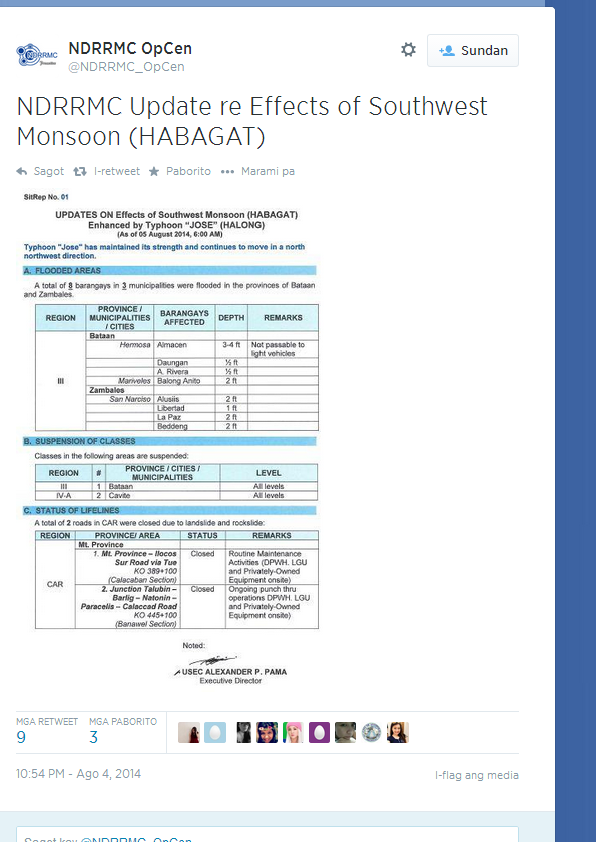
2014aug05 jose habagat ndrmc

 Although one cannot isolate the retweets and favorites that were direct results of @twitter_ph’s nesting of @NDRRMC_OpCen’s  Tweet, 4, 112 views (see analytics screen shot below) of @twitter_ph’s tweet in less than 12 hours indicate that a  good number of the intended audience (Filipino followers) have likely seen the nested Tweet.
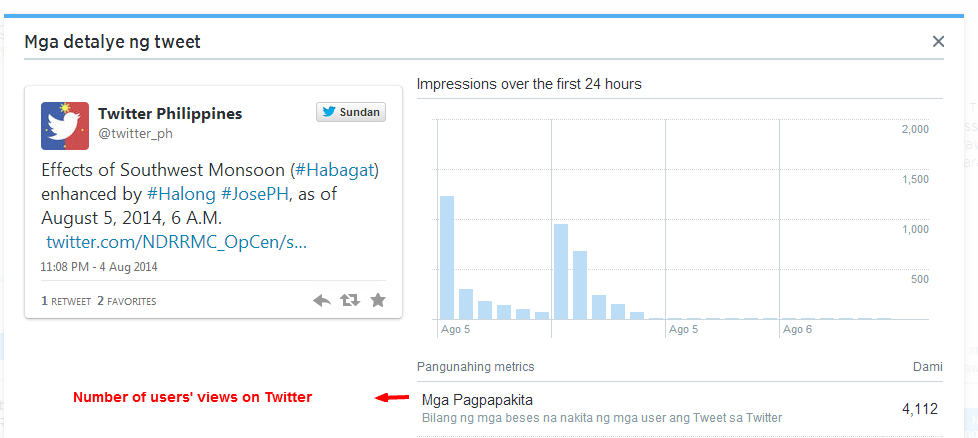
Analytics ng Aktibidad ng Tweet para sa twitter_ph 2014aug5

TAGALOG: Isang Tweet sa loob ng Tweet, sa loob ng Tweet, sa loob ng… (O) Dagdagan ang kakayahan ng Tweet mo

Mayroong paraan na makapagre-retweet ka ng isang twoosh (Tweet na gamit ang buong 140 characters) o mas maliit dito, makadadagdag ng sarili mong komento AT maipakikita ang buong pinalawak na Tweet. Kung ang Tweet na nire-retweet mo ay may laman ding Tweet, mahuhukay ng mambabasa mo kung gaano man kalalim ang salansan ng mga Tweet na ito, gaya ng isang set ng mga manikang matryoshka.

Mga hakbang sa pag-retweet sa loob ng isang tweet:

1. I-click ang marka ng oras at petsa ng Tweet na gusto mong i-retweet at kumentuhan:

sci museum permalink

2. Kopyahin ang permalink na lumalabas sa address field ng screen at ilagay ito sa Tweet na binubuo mo.

sci museum permalink

3. I-tweet.Ang retweet na bahagi nito, kapag na-click, ay magsisilbing kawing sa Tweet na kinukumentuhan mo.

ww1centenary tweet

TALA: Kung ang Tweet na kinukumentuhan at nire-retweet mo ay may larawan na ini-upload sa Twitter, (hindi sa ikatlong partido, gaya ng Instagram, atbp.), ang larawan ay ipapakita sa retweet.

mindjet photo

Lalabas din ang Tweet mo sa tab ng abiso ng Twitter account na ni-retweet mo.

Kung magiging isang popular na paraan ito ng pag-retweeet, itong tinatawag kong “nakasalansang mga Tweet” ay isang tahas na paraaan ng pagtalunton sa mga pinagmulang Tweet.

Ang Di-kainaman (o Kainaman, depende sa layunin ng iyong Tweet)

Kapag ang bahaging retweet ay nagdadala ng mas mahalagang impormasyon kaysa sa Tweet ng nagkukumento, maaaring matatabunan at malalagpasan ito, at ang orihinal na Tweet ang magtatamo ng resultang retweet at pagpaborito. Ito ang nilayong — at naaabot — na epekto ng sumusunod na serbisyong pampubliko ng @twitter_ph:

Twitter   twitter_ph  Effects of Southwest Monsoon ...

Ang layunin ng nagkukumento (@twitter_ph) ay ang idagdag ang mga hashtag na #Habagat #Halong at #JosePH upang mas madaling makita ng pinupuntiryang mambabasa (mga user sa Pilpinas) ang Tweet na serbisyong pampubliko. Ikumpara ang numero ng mga retweet at paborito ng Tweet na ito sa mga retweet at paborito ng Tweet ng @NDRRMC_Open’s na nakasalansan sa loob nito:

2014aug05 jose habagat ndrmc

 Bagama’t hindi maiihiwalay ang mga retweet at pagpaborito na naging direktang resulta ng pagsalansan ng @twitter_ph sa Tweet ng @NDRRMC_OpCen, ang numero ng pagpapakita ng Tweet sa mga tagasunod ng @twitter_ph,  4,112  sa loob ng 12 oras, (tingnan ang screen shot ng analitika sa ibaba) ay nagpapahiwatig na marami sa mga nilalayong mambabasa (mga tagasunod na Filipino) ang nakakita sa nakasalansang Tweet.
Analytics ng Aktibidad ng Tweet para sa twitter_ph 2014aug5

Part 2: Mga Bagong Tampok ng Twitter Profile (New Twitter Profile Features) (With English Translation)

Image

Ang Naka-Aspileng Tweet

Sa bawat Tweet, may opsiyon kang i-pin ito o panatilihing nasa taas ito ng profile mo, habang gusto mo. Tanong: Forever ba yung “pinned tweet” na ito?  Eh paano kung nagpalit ako ng isip? Sagot: Hindi — dahil may opsiyon ka sa bawat Tweet — puwede mong palitan nang palitan ang pinned Tweet mo. May opsiyon din na tanggalin ito nang walang kapalit. Ano’ng kaigihan nito? Puwede mong i-promote o isulong ang isang ideya, kaganapan, o impormasyon na gusto mong malaman ng mga tagasunod at mambabasa mo. Mga halimbawa: Ang pilosopiya o matinding paniniwala o feelings mo (quotation o tweet mo tungkol sa sarili mo,  sa buhay, o sa panahon) Image https://twitter.com/Tagalog_Quotes/status/472711507294171136

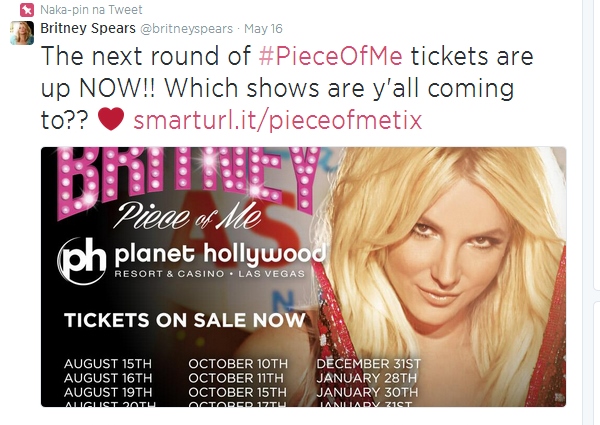
Ang susunod na konsiyerto ng mga stars o ng idolo mo (mas maganda kung may link) Image https://twitter.com/britneyspears/status/467351979077795840

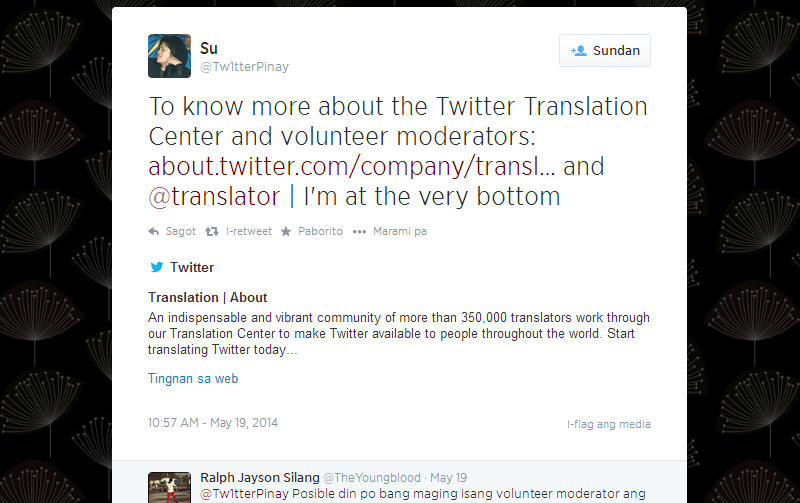
isang ideya, pangyayari, o oportunidad na gusto mong isulong Twitter   Tw1tterPinay  To know more about the Twitter Translation Center   https://twitter.com/Tw1tterPinay/status/468450431891279872

Ano ang nagagawa nito para sa akin?

Mas makikilala ka ng Twitter users na makakaenkontra sa profile mo. Mas makakahikayat ka ng mga tagasunod at mambabasa na interesado rin sa mga interes mo.  Inaasahan na matutuloy ito sa mas maraming interaksiyon mo sa iyong mga tagasunod at mambabasa .

ENGLISH: The Pinned Tweet

You have an option to pin your every Tweet to keep it at the top of your profile, for as long as you want. Q: Does the pinned tweet stay pinned “forever?” What if I change my mind? A: No — because you have the option for every Tweet — you can change your pinned Tweet anytime. You also have the option to unpin it without a replacement. What is its benefit/s? You can promote an idea, event or a piece of information that you want your followers or readers to know. Following are some examples: Your philosophy, belief or feelings (a quotation or tweet about yourself, about life or the times)

Image https://twitter.com/Tagalog_Quotes/status/472711507294171136

Your favorite star’s next concert (better with a link) Image https://twitter.com/britneyspears/status/467351979077795840

An idea, event, or opportunity that you want to promote

Twitter   Tw1tterPinay  To know more about the Twitter Translation Centerhttps://twitter.com/Tw1tterPinay/status/468450431891279872

What can it do for me?  Twitter users that encounter your profile get to know you better and quickly. This is a way to attract followers and readers that are also interested in the things and topics in which you are interested. Hopefully, this leads to your having more interaction/engagement with your followers and readers.

Mga Bagong Tampok ng Twitter Profile (New Twitter Profile Features) Part 1 (With English Translation)

Image

photo credit (creative commons) http://www.deviantart.com/art/Twitter-Logo-PSD-150481463

May bagong hitsura ang Twitter profiles! Ang mga ito ay naglalayon na pagyamanin at lalong gawing kasiya-siya ang Twitter experience mo. Isa sa mga pagbabagong inilabas kamakailan ay ang magkaibang laki ng Tweets.

Ang mga Tweet na maraming “engagement” o interaksiyon ay mas malaki kaysa sa iba mong mga Tweet. Mas marami ang nag-ki-klick sa, sumasagot (@reply), nagpapaborito o nagri-retweet ng tweet mo, mas malamang na mas malaki ang hitsura nito sa sarili mong timeline.

Tanong: Eh, kung ang tweet ay 1,000 ang interaksiyon — buong screen na ang laki?

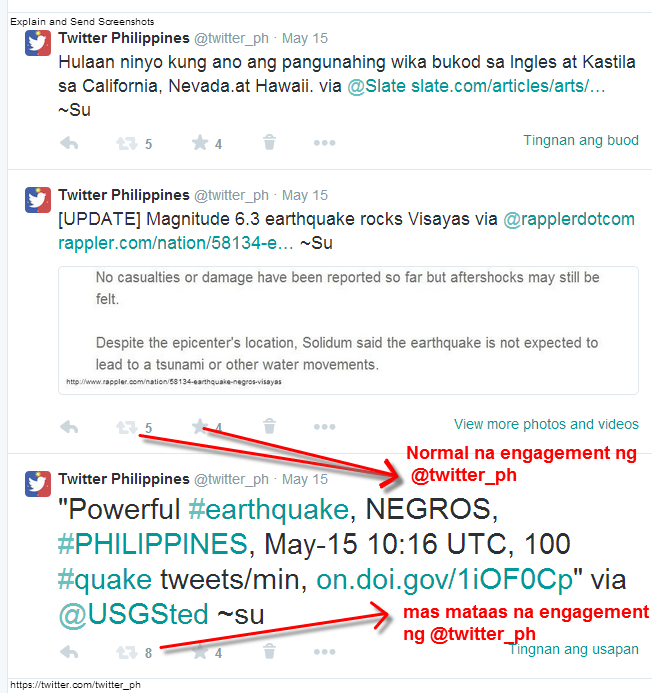
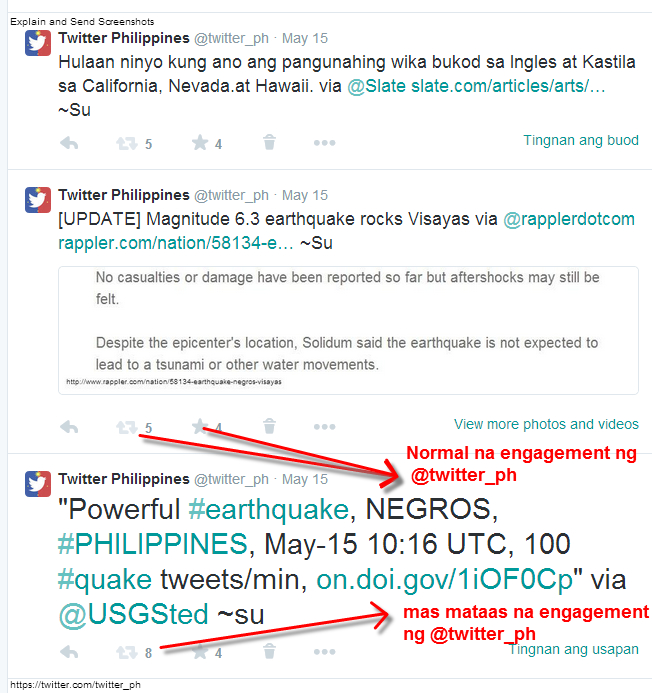
Sagot: Hindi naman. Dalawa lang naman ang laki ng titik. Ikumpara ang dalawang Tweets na sumusunod:

Image

Ang bawat Tweet mo ay kinukumpara sa karaniwang interaksiyon o engagement sa ibang Tweets mo. Kung karaniwan o average ang interaksiyon (base sa mga tweet mo), mananatili sa regular na laki ang font. Lumalaki naman ang titik kung higit sa karaniwang interaksiyon ang nakukuha ng Tweet mo.

Ang pakinabang nito:  Malalaman mo kung alin ang mas interesante o makabuluhang tweet sa mga mambabasa mo. Nilalayon ng feature na ito ang makatulong sa iyong pagpasiya kung ano’ng klaseng mga tweet ang i-po-post mo.

Susunod na post: Ang Nakaaspileng Tweet

[ENGLISH]

Twitter profiles have a new look! These updates are intended to enrich your Twitter experience. One of the features that Twitter rolled out recently is the size difference in fonts:

Tweets that get a lot of engagement or interaction are bigger than your other Tweets that don’t get as much engagement. Tweets that have more clicks, replies (@reply), favorites or retweets get a bigger font on your timeline.

Q: if the tweet has 1,000 interactions — do the fonts get as big as the screen?

A: Not really. There are only two font sizes. Compare the following two Tweets:

twitter ph engagement

Your every Tweet is compared to your other Tweets, in terms of interaction or engagement that they get. If the Tweet gets average engagement (based on your regular Tweets), it shows the regular font size. The font is bigger if the Tweet gets more than the usual interaction that your average Tweet gets.

Its use: You can find out which of your Tweets are more interesting or meaningful to your readers. This feature is intended to help you decide what kind of Tweets to post.

NEXT POST: Pinned Tweets